




Customer Reviews For The Honeywell Home T2 Simple Display Non-Programmable Thermostat

Overall Rating
Product Reviews
I can not fairly judge this, I have not installed it yet, but I like the simplicity of the design.
This Honeywell thermostat is the best product you can buy hands down. Easy to install. You will never have a problem with this product. The company will even help you install if you give them a quick call. I will always buy superior made Honeywell products for my home.
Replaced a much older thermostat. Connected by following the directions. With a little help, added a new feature: Auto - which allows holding a specific temperature, whether it needs heating or cooling. Very pleased.
Product is good for what it does. The only issue is that power outages can make them lock up and become useless.
Works like a charm! Really like the automatic heating and cooling single function. Set it and forget it. Am retired and don't need programing modes.
I bought a NEST programmable thermostat, costed me 150 dollars thought I was doing the right thing, my energy bill skyrocketed. I went back to this non-programable Honeywell and I LOVE IT!!!
I bought this thermostat to replace a Honeywell programmable unit that's been in use since I built the house in 2001, it wouldn't turn off the heater when the set temp was reached for some reason. Since we never programmed the previous one, I chose a simpler unit. It was easy to install, and had all the features I need for a heat pump with em/aux heat control. The minor negative, which I knew when I bought it, is that the display isn't powered by the 24V circuit and needs batteries.
Easy to install and operate. I like the large backlit display. A nice upgrade to my new place.
Replacement is a breeze and operation is easy. The backlit LED readout is a nice feature. We're delighted!
Product FAQs
There isn't a universal reset for all Honeywell Non-Programmable Thermostats. The process will vary depending on the specific thermostat. However, here are the two most common methods:
Method 1: Power Cycle Reset
- Turn off the power: This can be done by flipping the breaker that controls your HVAC system, or by removing the batteries from the thermostat (if battery-powered).
- Hold the reset button (if present): Some non-programmable Honeywell Thermostats have a dedicated reset button, usually located near the display or behind a cover panel. If your model has one, hold it down for about 5-10 seconds while the power is off.
- Restore power: Turn the breaker back on or reinsert the batteries.
Method 2: Menu Reset (for some models)
- Check your thermostat for a "Menu" button. Not all Honeywell Non-Programmable Thermostats will have one.
- If present, press and hold the "Menu" button. While holding it, navigate through the options (if any) until you find a "Reset" function. This might involve pressing arrow buttons.
- Select "Reset" and confirm the prompt (if applicable).
RTH5160D1003/E Video Guide
Watch this helpful video to learn more about the Honeywell Home T2 Simple Display Non-Programmable Thermostat, RTH5160D.

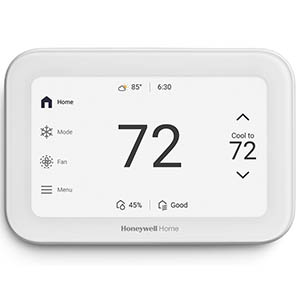



Read customer ratings and reviews for the Honeywell Home T2 Simple Display Non-Programmable Thermostat, RTH5160D. Learn what other customers have to say about their experiences, including what they liked, how the Honeywell Home T2 Simple Display Non-Programmable Thermostat met their expectations, and any concerns they encountered. These firsthand perspectives can provide helpful information beyond the standard product description.
Browse the reviews to compare customer ratings, explore positive and critical feedback, and make a more informed purchasing decision. If you've purchased or used this product, we encourage you to share your experience and help other shoppers find the right product for their needs.