




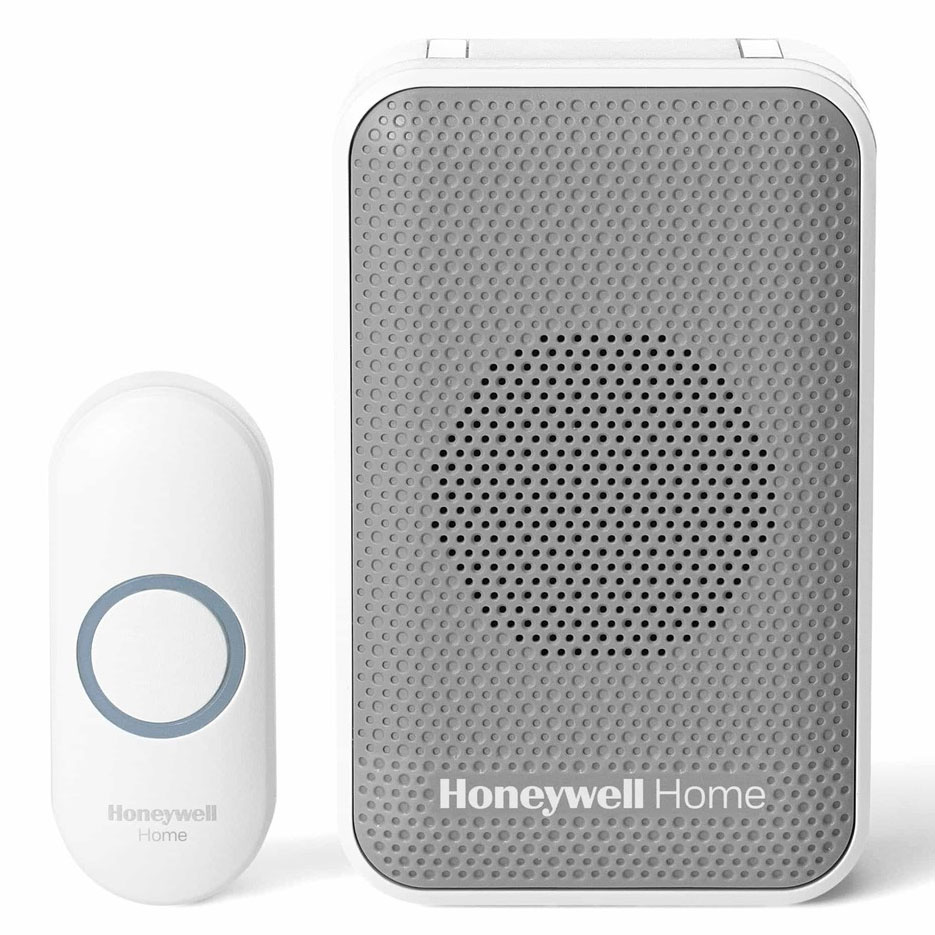
Customer Reviews For The Honeywell Home 3 Series Portable Wireless Doorbell with Strobe Light
Overall Rating
Product Reviews
The only problem was getting the battery seated properly.
Everything went together and worked right out of the box.
This is exactly what I was looking for!! I didn't want a doorbell that plugs into an outlet. The directions to set it up were easy to understand. The doorbell can be programmed to be loud enough so someone with poor hearing like I have can hear it. I like it that its portable, too. I also like the feature that allows it to light up when it rings. This is something that can be turned off if you want. Glad I made this purchase!!!
Bought for my 99 year old mom. She is very hard of hearing but she loves this one. It flashes as well as plays her tune.
Inexpensive and effective way to replace a wired doorbell
This is a wonderful product! I would recommend to all of my friends.
More features than you'll ever need. Great product at a Great price.
Gift for my dad's 85th birthday. He can't hear people knock on the door so has started leaving door open when he is expecting someone. Being concerned about safety, the doorbell will allow him to know when someone is at the door. It is loud enough to be heard all over the house when centrally located and he has his choice of tunes.
This is probably the best portable door bell that I have ever tried and believe me I have tried a lot. From ones that the battery lasts maybe a day to others that the chime box had to almost be next to the push button. With the options and the range this doorbell is way superior to others. You would not be disappointed in how well this one works.
Product FAQs
Yes. It is possible to link additional Honeywell Wireless Doorbells (via ActivLink Technology) to a Honeywell Door Push Button. You'll be able to place doorbells in different locations throughout your property. Be sure to select a wireless doorbell with the number of inputs you need, using the guide below as reference:
- Series 3 (RDWL311A) -- 2 inputs
- Series 3 (RDWL313A) -- 4 inputs
- Series 5 (RDWL515A) -- 4 inputs
- Series 9 (RDWL917A) -- 6 inputs
Yes, the Honeywell Store offers a range of wireless doorbells and compatible push buttons that will allow replacement of an old wired doorbell system.
Connect a push button and then follow these steps to change the ring and light settings for an existing doorbell.
- Press and hold the setting button on the doorbell for three seconds. The LED on the side will turn on with an amber color.
- Press the push button.
- Within 12 seconds of pressing the push button, press the music button to select the ring for that push button.
- Within 12 seconds of pressing the doorbell, press the sunlight button to select light setting for that push button. (only for models with a strobe light)
Yes, please watch this youtube video to learn more: Linking Push Buttons with Honeywell Home Series 3, 5 & 9 Wireless Doorbell.
To begin, you'll want to press a connected push button three times quickly. You'll then want to press the music button located on the side of the doorbell (within 12 seconds). The same process can be repeated with Series 5 and 9 doorbells when adjusting the halo light for the secret knock. Just press the sunlight button instead. We've made a video tutorial detailing the steps that can be found here: Setting up a Secret Knock for Honeywell Series 3, 5 & 9 Doorbells
Yes, the Honeywell Store offers a Wired to Wireless Doorbell Adapter Converter that connects to an existing wired Push button and bell transformer which will allow it to work with Honeywell wireless doorbells via Honeywell ActivLink.
It is strongly recommended that owners use alkaline batteries. These batteries provide a stable source of voltage. Rechargeable batteries (NiCd or NiMh) aren't recommended for operation.
Search for an "E" on the box. Any Honeywell push button or doorbell with the "E" compatibility mark will work together.
It's likely that the mute button has been pressed. The mute symbol will flash if the door push is activated. To get the sound back, press and hold the mute button until you hear a beep. The chime will now sound when the doorbell push is activated.
RDWL313A2000/E Video Guide
Watch this helpful video to learn more about the Honeywell Home 3 Series Portable Wireless Doorbell with Strobe Light and Push Button - RDWL313A.
Read customer ratings and reviews for the Honeywell Home 3 Series Portable Wireless Doorbell with Strobe Light and Push Button - RDWL313A. Learn what other customers have to say about their experiences, including what they liked, how the Honeywell Home 3 Series Portable Wireless Doorbell with Strobe Light met their expectations, and any concerns they encountered. These firsthand perspectives can provide helpful information beyond the standard product description.
Browse the reviews to compare customer ratings, explore positive and critical feedback, and make a more informed purchasing decision. If you've purchased or used this product, we encourage you to share your experience and help other shoppers find the right product for their needs.